
How Emails Are Sent: A Simple Guide to Email Delivery

When you hit send on an email, it does not instantly teleport to the recipient's screen. Instead, it triggers a rapid sequence of digital handshakes involving client applications, mail servers, domain name lookups, and specialized transfer protocols.
Understanding how emails are sent—and the mechanics governing protocols like SMTP, IMAP, and POP3—helps businesses and everyday users identify why certain messages never reach the inbox.
From technical verification checks to anti-spam filters, uncovering this behind-the-scenes pathway is the key to mastering email deliverability and protecting critical communications.

How Emails Are Sent: What Happens Behind the Scenes?
When you send an email, the message does not travel directly from your device to the recipient’s device. Instead, it passes through mail servers that communicate with one another to transfer, receive, and store your message.
Understanding how emails are sent helps explain what happens after you click Send, how the recipient receives the message, and why some emails fail to arrive. It also helps business owners understand email deliverability and why sending an email does not automatically mean it will reach the recipient’s inbox.
Feature: Explore our email deliverability service for small businesses in Nigeria.
How Does Email Work?
Email works through a system of applications, mail servers, and communication protocols that allow people to exchange electronic messages over the internet.
For example, imagine sending an email from your Gmail account to a customer using a Yahoo Mail account. Gmail handles your outgoing message, while the receiving mail system handles its delivery and storage.
The process involves several components:
Email client: The application or website you use to write and read emails, such as Gmail, Outlook, or Apple Mail.
Outgoing mail server: The server responsible for sending your message to its destination.
DNS (Domain Name System): A system that helps identify the mail server responsible for receiving emails for a particular domain.
Receiving mail server: The server that accepts incoming messages for the recipient’s email domain.
Recipient’s mailbox: The place where the delivered message is stored until the recipient accesses it.
These components work together to move your message from the sender’s account to the recipient’s mailbox.
What Happens When You Send an Email?
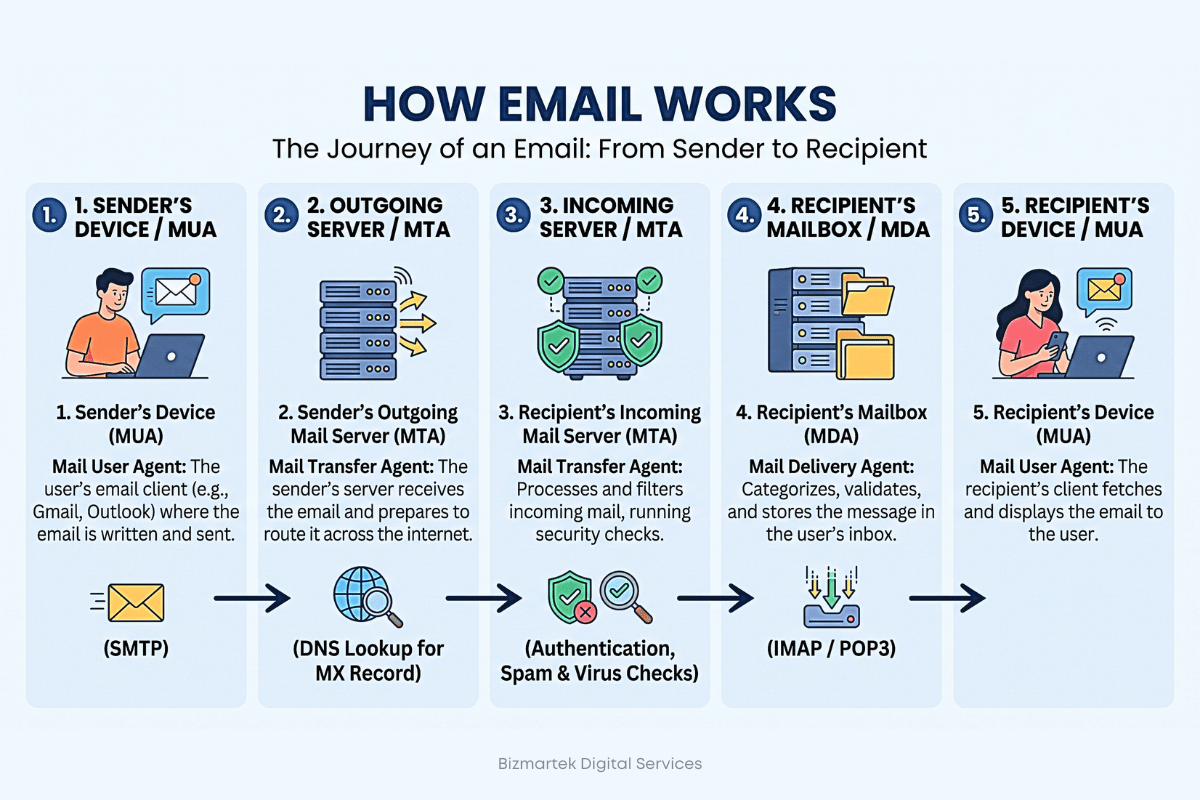
Sending an email involves several steps, most of which happen within seconds under normal conditions. Here is what happens behind the scenes when you compose a message and click Send.
The email application prepares your message
You open your email application, enter the recipient’s email address, write your subject and message, and attach any necessary files.
The application packages this information into an email message. It includes details such as the sender, recipient, subject, message body, and other technical information contained in the email headers.
If you attach a photograph, PDF, or document, the application prepares the attachment for transmission as part of the message.
The outgoing mail server receives the email
After you click Send, your email application submits the message to an outgoing mail server. This server handles the next stage of the delivery process.
For example, when you send a message through Gmail, Google’s mail infrastructure processes the outgoing email. The application may connect to the server using SMTP or a secure, provider-specific submission method.
The server can also apply authentication, account restrictions, and spam-related checks before allowing the message to proceed.
The sending server finds the recipient’s mail server
The sending system needs to identify which mail server handles incoming emails for the recipient’s domain.
It uses the Domain Name System (DNS) to look up the domain’s MX records, which specify the mail servers designated to receive email for that domain.
For instance, if you send a message to [email protected], the sending system looks up the mail routing information for example.com. It then attempts to connect to an appropriate receiving mail server.
The receiving server checks the message
The recipient’s mail server examines the incoming message before deciding whether to accept it.
Depending on the provider, checks may include sender authentication, spam signals, reputation, message content, attachment risks, and applicable security policies.
The server may accept the message, reject it, or temporarily defer delivery. Even after acceptance, the message may be placed in spam rather than the primary inbox.
The email reaches the recipient’s mailbox
If the receiving server accepts the message, it stores it in the recipient’s mailbox or routes it through the provider’s internal mail system.
The recipient can then open Gmail, Outlook, Yahoo Mail, or another email client to read the message.
The recipient’s application retrieves or synchronises the message with the mailbox using an appropriate access method. The recipient does not need to be online when the sender transmits the email.
How Are Emails Received?
Receiving an email is different from sending one. Sending involves transferring a message to the destination, while receiving involves accessing a message that has been accepted and stored by the receiving mail system.
When someone sends you an email, the receiving server handles the incoming message and stores it in your mailbox if it passes the server’s acceptance checks.
Your email application then displays the message when it synchronises with the mailbox or retrieves the latest messages.
Two common protocols used to access received emails are IMAP and POP3.
How IMAP works
IMAP stands for Internet Message Access Protocol. It allows an email application to access and synchronise messages stored on a mail server.
This is useful when you use the same email account on your phone, laptop, and desktop computer. Actions such as reading messages, moving emails into folders, and deleting messages can synchronise across devices, depending on the provider and settings.
How POP3 works
POP3 stands for Post Office Protocol version 3. It allows an email application to retrieve messages from a mail server.
Depending on the configuration, downloaded messages may be removed from the server or retained there. POP3 generally offers less comprehensive mailbox synchronisation across multiple devices than IMAP.
What Are the Main Email Protocols?
Email protocols are standard rules that allow different applications and mail servers to communicate. Without them, systems from different providers would not have a common method for sending and accessing messages.
The three main protocols to understand are SMTP, IMAP, and POP3.
Protocol | Full meaning | Main purpose |
|---|---|---|
SMTP | Simple Mail Transfer Protocol | Sends outgoing email and transfers messages between mail servers. |
IMAP | Internet Message Access Protocol | Accesses and synchronises emails stored on a mail server. |
POP3 | Post Office Protocol version 3 | Retrieves emails from a mail server, often by downloading them to a device. |
SMTP: Sending emails
SMTP is the primary protocol used to submit outgoing emails and transfer messages between mail servers.
When you send a business proposal from your company email address, SMTP-compatible systems help move the message towards the recipient’s mail server.
SMTP handles message transmission, but it does not guarantee inbox placement. A message can be transmitted successfully and still be filtered into spam.
IMAP and POP3: Accessing emails
IMAP and POP3 help email applications retrieve messages that have already reached a mail server.
IMAP is commonly suited to people who access their email across several devices because it supports mailbox synchronisation. POP3 is an alternative when the preferred setup involves downloading messages to an email application.
These protocols serve a different purpose from SMTP: they help you access received messages rather than primarily transfer outgoing ones.
Why Do Some Emails Fail to Deliver?
An email can fail at different stages of the delivery process. Sometimes the receiving server rejects the message; in other cases, it accepts the email but places it in spam or another folder.
Common causes include the following.
Incorrect recipient email address
If you enter the wrong email address or use a domain that does not exist, the sending system may be unable to deliver the message.
For example, sending an email to [email protected] instead of the intended address may result in a delivery failure.
What to do: Check the spelling of the recipient’s address and confirm that the mailbox exists.
The recipient’s mailbox is full
Some email providers impose storage limits. If a mailbox has reached its limit, the receiving system may reject incoming messages until space becomes available.
What to do: Contact the recipient through another channel and ask them to check their mailbox storage.
Spam filters block the message
Email providers use filtering systems to identify potentially unwanted or harmful messages. These systems may consider sender reputation, message content, sending behaviour, authentication results, and other signals.
A legitimate business email can sometimes be filtered into spam, particularly when the sending domain has a poor reputation or the message triggers filtering rules.
What to do: Review the message content, investigate authentication and reputation issues, and ask the recipient to check their spam folder.
Email authentication is missing or incorrect
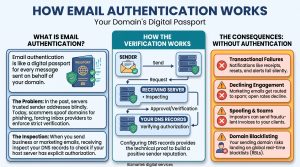
Email authentication helps receiving servers verify whether a message is authorised to use a particular domain.
Three important technologies are:
SPF (Sender Policy Framework): Identifies servers authorised to send email for a domain.
DKIM (DomainKeys Identified Mail): Adds a cryptographic signature that receiving systems can verify to check message integrity and domain association.
DMARC (Domain-based Message Authentication, Reporting and Conformance): Tells receiving systems how to handle messages that fail specified authentication checks and provides reporting capabilities.
Incorrect or missing authentication can contribute to delivery problems, especially when sending email at scale or using third-party email marketing platforms.
What to do: Configure SPF, DKIM, and DMARC correctly for your sending domain, following your email provider’s instructions.
The sending server has a poor reputation
Email providers consider the reputation of sending domains and IP addresses when evaluating incoming messages.
Repeated complaints, spam-like sending behaviour, poor list quality, and other negative signals can affect that reputation. As a result, messages may be rejected, deferred, or filtered.
What to do: Send relevant emails to people who have agreed to receive them, remove invalid addresses, and investigate unusual bounce rates or spam complaints.
Temporary server or network problems
Mail servers occasionally experience outages, connectivity issues, or temporary capacity problems. The receiving server may defer a message rather than accept it immediately.
Many mail systems automatically retry temporary failures. If delivery continues to fail, the sender may eventually receive a failure notification.
What to do: Check the delivery notification, identify the error reported, and retry or contact the email provider when necessary.

What Is Email Deliverability?
Email deliverability refers to the ability of an email to reach the intended recipient’s mailbox, particularly the inbox rather than the spam folder.
It is different from simply sending an email. Your email application may confirm that a message was sent, but that confirmation does not necessarily mean the receiving server accepted it or that the recipient can find it in the inbox.
For businesses, email deliverability is important because messages must reach their intended audience to serve their purpose.
For example, a Nigerian business might send order confirmations, invoices, appointment reminders, or promotional campaigns. If these messages are rejected or filtered into spam, customers may miss important information.
Good email deliverability depends on several factors, including:
Correct recipient addresses and a clean mailing list.
Proper SPF, DKIM, and DMARC configuration.
A credible sending-domain and IP reputation.
Relevant content and responsible sending practices.
Compliance with the recipient provider’s requirements.
How Email Marketing Platforms Send Emails
Email marketing platforms use the same underlying email delivery principles, but they add tools for managing contacts, creating campaigns, scheduling messages, and measuring results.
When a business sends a newsletter or promotional campaign, the platform processes the campaign and submits messages through its sending infrastructure. The messages are then routed towards the recipients’ mail servers.
For example, a Nigerian online store might send an email announcing a new product collection to customers who subscribed to its mailing list.
The platform can report delivery attempts, bounces, clicks, and other campaign activity. However, the meaning of each metric depends on how the platform defines and measures it. A reported delivery does not necessarily mean that the message appeared in the primary inbox or was read.
Businesses should therefore pay attention to list quality, sender authentication, recipient consent, and campaign relevance instead of focusing only on the number of emails sent.
Frequently Asked Questions About How Emails Are Sent
Does an email go directly from one phone to another?
No. An email normally passes through mail servers that process, route, and store the message. The recipient’s phone accesses the message through an email application connected to the recipient’s mail service.
How long does it take for an email to arrive?
Many emails arrive within seconds, although delivery can take longer because of server delays, temporary failures, filtering, or other technical issues. There is no universal delivery time for every email.
Can an email be sent without an internet connection?
You can compose an email offline in an application that supports offline access. However, the message generally cannot be transmitted to the recipient until the application reconnects and submits it to the mail system.
What is the difference between an email being sent and delivered?
Sent usually means the sending application or service has processed or submitted the message. Delivered generally means the receiving system has accepted it, although the exact definition varies by provider. Neither status guarantees that the email reached the primary inbox or was read.
Why does an email go to spam instead of the inbox?
Spam filters evaluate several signals, including authentication, sender reputation, content, and sending behaviour. A message may be classified as spam even when the sender intended it to be legitimate.
Conclusion
Emails are sent through a coordinated system of applications, mail servers, DNS records, and communication protocols. SMTP supports message transmission, while IMAP and POP3 help users access received messages. The receiving server evaluates incoming emails before accepting them, and additional filtering determines where accepted messages appear.
Understanding how emails are sent also makes delivery problems easier to investigate. Incorrect addresses, authentication errors, server issues, and spam filtering can all affect whether a message reaches its intended destination. For businesses using email marketing, reliable delivery depends on correct technical configuration, responsible sending practices, and relevant communication.
Ready to Grow Your Sales With Email Marketing?
Stop guessing. Get proven digital marketing strategies that bring in real customers.
Get Started With UsFree to start • No credit card required

Explore EMAIL MARKETING Mastery

Marketing & Lead Nurturing Emails: How to Convert Leads into Loyal Customers
How to Set Up Brevo for Transactional Emails on WordPress Sites

Best Transactional Email Platform for WordPress Sites
Transactional Email: Its Role in Email Marketing
View More EMAIL MARKETING Articles (9 more)
How to Set Up SPF, DKIM and DMARC for WordPress Sites Using cPanel

Email Authentication: Complete DNS Setup Guide for Better Delivery

How to Start Email Marketing in Nigeria

How to Recover Abandoned Carts in Nigeria 2026
10 Best Email Marketing Software in Nigeria Today

Email Marketing Services for E-commerce Brands in Nigeria

Email Marketing Automation for Real Estate Firms in Nigeria

Types of Emails for Your Email marketing
