
Email Authentication: Complete DNS Setup Guide for Better Delivery

Email deliverability challenges often trace directly back to missing or incorrectly configured DNS records. When mailbox providers like Google and Yahoo cannot verify that incoming messages genuinely originate from your domain, they protect their users by filtering those emails into spam or blocking them entirely. Setting up standard email authentication protocols—specifically MX records, SPF, DKIM, and DMARC—creates a verified digital passport for your domain.
This guide explains these core technical requirements in plain, accessible terms so business owners and marketing teams can secure their domain reputation and ensure business-critical emails reach intended inboxes.
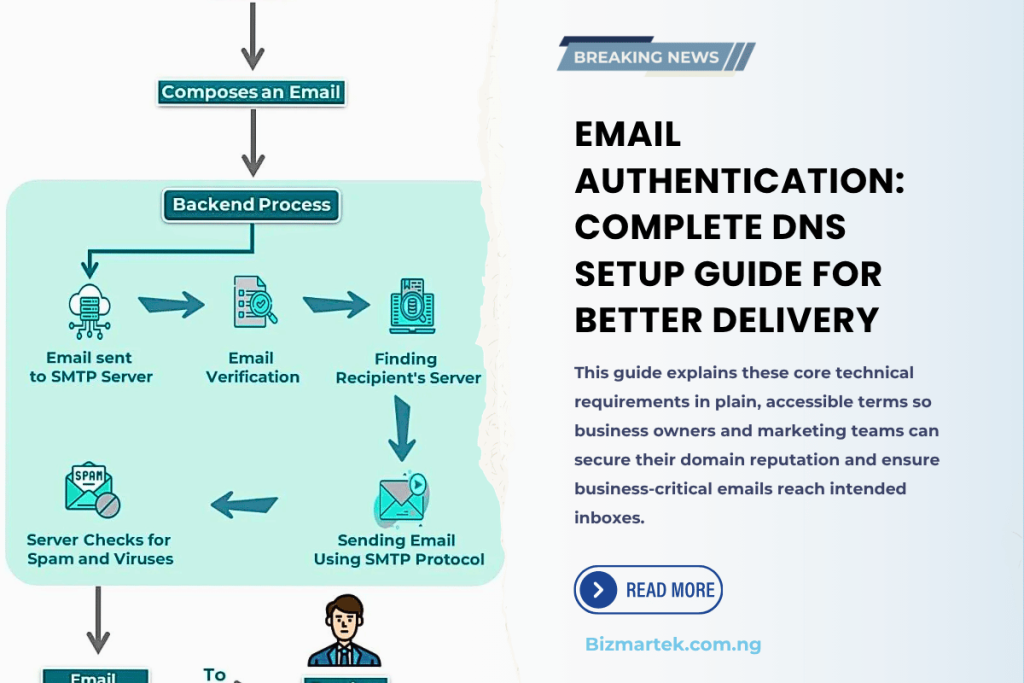
1. DNS and MX Records (The Foundation)
Before you can authenticate outbound messages, your domain must know where to direct electronic mail traffic.
The Domain Name System (DNS) functions as the address book of the internet, translating readable domain names (like yourbusiness.com.ng) into machine-friendly IP addresses. Within your DNS manager, different record types perform specialized tasks.
A Mail Exchange (MX) record tells the global internet which mail servers handle incoming email for your domain.
How it works: When someone sends an email to [email protected], the sender’s server queries your DNS for your MX record to discover where to deliver the message.
Deliverability impact: If your MX records are missing, expired, or pointing to an inactive mail server, receiving servers will often reject your outbound emails as well. Mail servers expect every legitimate sender to have a valid system in place to receive incoming mail and return notices.
2. SPF (Sender Policy Framework)
SPF is an open standard that allows a domain owner to publish a list of IP addresses or third-party platforms permitted to send email on their behalf.
How it works in plain terms: An SPF record is a single line of text (TXT record) placed in your DNS settings. It acts like an authorized guest list at an office reception desk. If a message arrives claiming to be from your domain, the recipient’s mail server checks your published SPF record. If the sending server’s IP address appears on your list, the message passes.
Common pitfall: Businesses often add multiple SPF records when integrating new tools (like accounting software or an email marketing service). A domain must have only one combined SPF record. Having multiple separate SPF entries causes the entire validation to break, leading to immediate spam filtering.
3. DKIM (DomainKeys Identified Mail)
While SPF verifies the sending server’s location, DKIM verifies that the email content was not intercepted or altered along the way.
How it works in plain terms: DKIM uses public-key cryptography. When an email leaves your sending server, the server generates a unique digital signature embedded in the email header using a private key. Your public key is published in your domain’s DNS records.
The verification process: When the recipient’s server receives the email, it retrieves your public key from your DNS and uses it to unlock and verify the signature. If the digital signature matches, it confirms two things: the email genuinely came from your system, and nobody modified the contents, links, or attachments in transit.
4. DMARC (Domain-based Message Authentication, Reporting, and Conformance)
DMARC unites SPF and DKIM under a centralized security policy and tells receiving mail servers what action to take if an incoming message fails authentication.
How it works in plain terms: SPF and DKIM operate independently. DMARC ties them together through a process called “alignment.” It checks whether the domain visible in the recipient’s “From” line matches the domains verified by SPF and DKIM.
Enforcement policies: DMARC allows you to choose one of three policy instructions:
p=none (Monitoring mode): Messages that fail checks are still delivered, but you receive aggregate reports detailing who sent them.
p=quarantine: Messages that fail authentication are sent directly to the recipient’s spam or junk folder.
p=reject: Messages that fail are blocked entirely at the server level and never reach the user.
Deliverability impact: Major providers like Google Workspace and Yahoo Mail enforce mandatory DMARC rules for bulk senders. Domains without DMARC face immediate deliverability throttling and outright rejection.

Other Technical Requirements for Better Email Deliverability
Configuring MX, SPF, DKIM, and DMARC provides the technical foundation for inbox delivery. However, sustained email deliverability also relies on additional network and server configurations:
Reverse DNS (rDNS) and PTR Records: A Pointer (PTR) record maps an IP address back to its corresponding domain name—the exact reverse of a standard DNS lookup. Receiving mail servers use rDNS to ensure that the sending mail server actually belongs to the claimed host. Most commercial email hosts handle this automatically, but dedicated sending servers require manual configuration.
Custom Tracking Domains (Branded Links): When using third-party email marketing platforms, click-tracking links inside your emails often use the platform’s default shared domain. If other users on that shared domain send spam, their negative reputation can bleed into your campaign. Setting up a custom tracking subdomain (such as links.yourbusiness.com.ng) keeps your link reputation isolated and professional.
BIMI (Brand Indicators for Message Identification): BIMI is an advanced standard that builds on strict DMARC enforcement. It allows authenticated senders to display their verified company logo directly beside the sender name inside supporting inboxes (like Gmail and Apple Mail). This boosts recipient trust and open rates while verifying authenticity.
TLS (Transport Layer Security) Encryption: Modern email servers expect end-to-end encryption for messages in transit. Ensuring your sending server supports opportunistic TLS prevents eavesdropping and satisfies the security requirements of modern email providers.
How to Test and Verify Your Authentication Setup
Once you add your records to your DNS dashboard, do not assume they are working without testing. DNS records can take anywhere from a few minutes to 48 hours to fully propagate worldwide.
Use these practical methods to confirm your setup:
Send a Test Email to Gmail: Send a plain text message from your business email account to a personal Gmail inbox. Open the email, click the three vertical dots in the upper-right corner, and select “Show original.” Look at the summary table at the top. You should see clear green “PASS” indicators next to SPF, DKIM, and DMARC.
Use Free Validation Tools: Web-based diagnostic tools such as MXToolbox, Mail-Tester, or DMARCian allow you to send a test message to an automated address or enter your domain name to scan your live DNS records for syntax errors or misconfigurations.
Monitor DMARC Aggregate Reports: When setting up your DMARC record, include an administrative reporting email address (using the rua tag). Third-party DMARC analyzers can parse these XML reports to alert you if unauthorized servers are attempting to send mail using your company name.
Ready to Complete DNS Setup For Your Business?
Stop guessing. Get proven technical email marketing strategies that bring in real customers.
Get Started With UsFree to start • No credit card required

Explore EMAIL MARKETING Mastery

Marketing & Lead Nurturing Emails: How to Convert Leads into Loyal Customers
How to Set Up Brevo for Transactional Emails on WordPress Sites

Best Transactional Email Platform for WordPress Sites
Transactional Email: Its Role in Email Marketing
View More EMAIL MARKETING Articles (9 more)
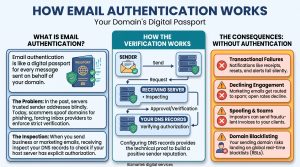
How to Set Up SPF, DKIM and DMARC for WordPress Sites Using cPanel

How Emails Are Sent: A Simple Guide to Email Delivery

How to Start Email Marketing in Nigeria

How to Recover Abandoned Carts in Nigeria 2026

10 Best Email Marketing Software in Nigeria Today

Email Marketing Services for E-commerce Brands in Nigeria

Email Marketing Automation for Real Estate Firms in Nigeria

Types of Emails for Your Email marketing
