Meta Ads Manager 2026: The Complete Setup Guide

Key Highlights
- Understand what changed in Facebook Ads Manager’s biggest overhaul in years, and why tutorials from before 2024 are now outdated
- Get the full three-level campaign structure explained clearly: campaign, ad set, and ad
- Learn exactly what Advantage+ does now that it’s merged into every campaign by default
- See the most common setup mistakes that quietly kill campaign performance
- Know when managing this yourself makes sense, and when it doesn’t
- Facebook Ads Manager has been officially called Meta Ads Manager since 2021; “Facebook Ads Manager” remains the common shorthand
- Meta consolidated its old 11-objective system into six streamlined objectives in 2024, then merged Manual and Advantage+ setup into a single unified flow in February 2026
- Every campaign now runs on AI-driven optimization by default (audience, placements, budget), though each can still be toggled off individually
- Your campaign’s objective, currency, and timezone are locked in at setup, changing them later requires rebuilding from scratch
- Most underperforming campaigns trace back to a handful of avoidable mistakes, not bad luck or a broken algorithm
Facebook Ads Manager is the tool you use to create, run, and measure paid ad campaigns across Facebook, Instagram, Messenger, and Meta’s Audience Network. If the last time you touched it was a few years ago, or you’ve only seen tutorials from before 2024, be aware: the interface has changed more in the past two years than in the five before that, and a lot of “how to use Facebook Ads Manager” content still floating around online describes a version of the platform that no longer exists.
What Is Facebook Ads Manager, and Why Is It Now Called Meta Ads Manager?
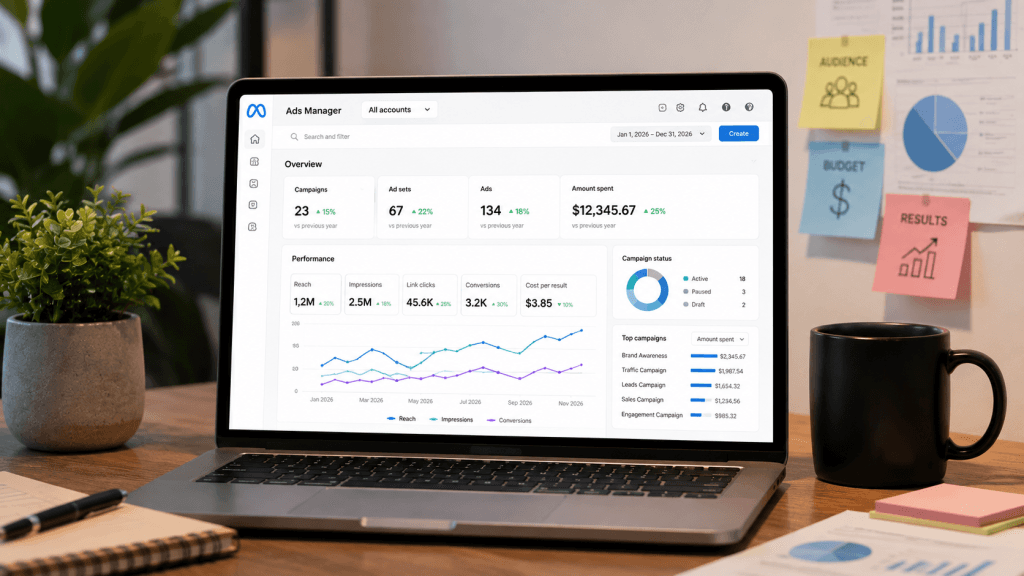
Facebook Ads Manager is the web-based dashboard where every paid campaign on Facebook and Instagram gets built, launched, monitored, and adjusted. It’s not just a place to upload an image and set a budget; it’s a full reporting and optimisation environment, showing you spend, reach, results, and cost-per-outcome broken down by campaign, ad set, and individual ad, updated in near real time as your campaigns run.
The name shift matters more than it might seem for anyone searching for help online. Facebook rebranded its parent company to Meta in 2021, and the ad platform, formerly known simply as Facebook Ads Manager, is now officially Meta Ads Manager. That’s because a single campaign built inside it doesn’t just run on Facebook anymore; the same campaign can simultaneously serve ads across Facebook, Instagram, Messenger, and Meta’s Audience Network (a collection of third-party apps and websites that show Meta ads), all managed from one unified dashboard rather than separate tools for each platform.
Despite the official rebrand, “Facebook Ads Manager” and “Facebook Ads” remain the common shorthand most people actually use in conversation and in search, even when the ads in question are appearing primarily on Instagram or Messenger. You’ll see both names used interchangeably across this guide and pretty much everywhere else online, and it’s worth knowing they refer to the exact same tool.
How Is a Campaign Structured? Campaign, Ad Set, and Ad Levels Explained
Every campaign in Ads Manager is built across three distinct levels, and understanding this structure properly is the single most important foundation for everything else in this guide, because most confusing or frustrating problems in Ads Manager trace back to a misunderstanding at one of these three levels.
The campaign level is where you set your objective, what you’re actually trying to achieve, and often your overall budget if you’re using a campaign-level budget rather than setting budgets individually at the ad set level. This is also where you name the campaign itself. Here’s the detail that catches a lot of people off guard: the objective you choose at this level is locked in permanently once the campaign is created. You cannot go back and simply change a Traffic campaign into a Sales campaign later; the system requires you to duplicate the campaign structure or build an entirely new one from scratch. That makes getting the objective right at the very start far more important than it might initially seem, since a wrong choice here isn’t a quick fix later.
The ad set level sits below the campaign, and this is where the real targeting decisions happen: your audience definition (who you want to reach), your placements (where the ad shows up, Feed, Stories, Reels, and so on), your schedule (when it runs), and critically, your specific optimization event, the exact action, a purchase, a completed lead form, a link click, that you’re telling the algorithm to chase. You can run multiple ad sets under one campaign, each with a different audience or placement strategy, all working toward the same overall objective set at the campaign level above.
The ad level is the most concrete of the three: this is where your actual creative lives, the images or video people will see, your ad copy, your headline text, and your call-to-action button (Shop Now, Learn More, Sign Up, and so on). You can, and generally should, run multiple ad variations within a single ad set, giving the algorithm several creative options to test against each other rather than relying on just one.
Getting the structure wrong at any of these three levels tends to produce problems that look, from the outside, like “the algorithm isn’t working” or “Facebook ads just don’t work for my business,” when the real, fixable issue is almost always structural: too many ad sets quietly competing for the same audience, an objective mismatched to what you’re actually trying to achieve, or creative that isn’t giving the algorithm enough variation to find what performs.
What Are the Six Campaign Objectives in 2026?
Meta consolidated its older, considerably more fragmented objective list, which numbered eleven distinct options at one point, down to six streamlined choices in 2024, and this remains the standard structure you’ll see in Ads Manager throughout 2026: Awareness, Traffic, Engagement, Leads, App Promotion, and Sales.
Each of these tells the algorithm a fundamentally different thing to optimise for, and picking the wrong one relative to your actual business goal is one of the most common, avoidable reasons a campaign underperforms.
- Awareness: Optimises for the widest possible reach and brand recall, useful for a launch or a rebrand, but not built to drive direct action.
- Traffic: Optimises specifically for link clicks, which sounds useful but can deliver cheap clicks from people with no real purchase intent if that’s not genuinely your goal.
- Engagement: Targets likes, comments, shares, and post interactions, useful for building social proof but disconnected from revenue on its own.
- Leads: This objective is built specifically around form submissions or messaging conversations, ideal for service businesses collecting inquiries rather than processing direct online payments.
- App Promotion: Optimises for installs and in-app actions, relevant only if you’re marketing a mobile app specifically.
- Sales: is built around actual purchases and revenue, and requires proper conversion tracking (typically through the Meta Pixel or Conversions API) to work effectively.
The practical takeaway: if revenue is genuinely your goal, choosing Traffic or Awareness because they look cheaper or simpler in the interface will actively work against you, since you’re explicitly instructing the algorithm to optimise for something other than what you actually want. The Sales objective, paired with correctly implemented conversion tracking, is what tells the algorithm to go find people who buy, not just people who click.
What Changed With Advantage+ in 2026?
This is the single biggest shift worth understanding if you haven’t logged into Ads Manager recently, and it’s a genuinely different experience from even eighteen months ago. Advantage+ is Meta’s AI-driven automation layer, and it handles audience discovery, placement selection, budget distribution across ad sets, and creative combination testing, tasks that used to require significant manual setup and ongoing manual adjustment.
Until early 2026, using Advantage+ meant explicitly choosing it over a separate “Manual” campaign setup path, a distinct fork in the road at the very start of campaign creation. That fork no longer exists. As of February 2026, Meta merged the manual and Advantage+ flows into a single, unified campaign creation process. Practically, this means AI-driven optimisation is now switched on by default across audience targeting, placement selection, and budget allocation for every new campaign you create, whether you consciously chose it or not. You can still turn off automation for any one of these three elements individually if you have a specific reason to exert more manual control, but full automation is now the starting point rather than an optional add-on. A green “Advantage+ On” label visible inside Ads Manager confirms when a given element is running in automated mode.
Alongside this structural merge, Advantage+ Shopping Campaigns were renamed Advantage+ Sales Campaigns in early 2025, and their scope expanded well beyond pure e-commerce to also support lead generation and app install objectives, a meaningful broadening from when the format was exclusively built for online stores.
Whether this automation genuinely benefits you depends heavily on your account’s data history. For newer accounts with little conversion history yet, or businesses in categories that require precise audience control (certain regulated industries, for example), some manual targeting still tends to yield more predictable, controllable early results than handing everything to the algorithm immediately. For accounts with clean tracking data (a properly implemented Pixel, accurate Conversions API setup) and real purchase history behind them, Advantage+ generally performs at least as well as manual setup, and often noticeably better, simply because it has access to more inventory and more signal to optimise delivery within than a manually narrowed audience would allow.
How Do You Actually Set Up a Campaign, Step by Step?
Start at the campaign level: choose your objective from the six covered above, based on your actual business goal rather than which one sounds simplest, and name your campaign specifically and descriptively, especially important once you’re running more than one campaign at a time and need to tell them apart at a glance in your reporting.
Set up your ad account details next, and treat this step with real care: country, currency, and timezone. Meta uses this information for all future billing and reporting on this account, and you cannot change currency or timezone later without abandoning this account and creating an entirely new one from scratch, losing any accumulated history and learning in the process. For Nigerian businesses specifically, this decision carries extra weight, since it determines whether your ongoing billing and every report you pull runs in Naira or a foreign currency like USD, and unwinding a wrong choice here isn’t a quick settings change, it’s a full account rebuild.
Move to the ad set level next: define your audience, which can be built from custom audiences (uploaded lists of existing customers or website visitors), lookalike audiences (people who resemble your existing customers), or straightforward interest and demographic targeting. Select your placements, spanning Facebook Feed, Reels, Stories, and Marketplace; Instagram Feed, Stories, Reels, and Explore; Messenger; and Meta’s Audience Network of third-party apps. Then choose your optimisation event, the precise action- a purchase, a completed lead form, a specific click- that you want the algorithm actively working to generate more of.
On placements specifically: Advantage+ Placements, now the current default, automatically distributes your ad across every eligible surface and shifts delivery toward whichever performs best for your specific objective, learning and adjusting as the campaign runs. Manual placement selection still has a legitimate place if you have a strong, specific creative reason; a vertical video built and shot specifically for Instagram Reels, for instance, wouldn’t necessarily perform well cropped into a right-column desktop placement. But for the large majority of advertisers, giving the algorithm access to more inventory through automatic placements outperforms manually narrowing your options from the outset.
Finally, set your budget and start scheduling. A practical, commonly recommended starting point for a Sales campaign is roughly $20-30 a day, or the equivalent in Naira, which is generally enough to generate meaningful, decision-worthy data within about 7 to 10 days before you commit to scaling the budget up further based on what you’re actually seeing.
What Is the Learning Phase, and How Do You Get Through It Efficiently?
Every new ad set, and every existing ad set that gets significantly edited, enters what Meta calls a learning phase, a period during which the algorithm is still actively testing different audience segments, placements, and delivery patterns to figure out how to run your specific ad most efficiently. Performance during this window is typically both less stable and more expensive per result than it will settle into afterward, which catches a lot of new advertisers off guard when their first few days of results look worse than expected.
Meta generally recommends accumulating around 50 conversion events per ad set within a rolling 7-day window as the threshold to exit this phase cleanly and reach stable, more efficient delivery. If your budget or your audience size simply can’t realistically generate that volume of conversions in a week, and this is a common situation for smaller Nigerian businesses working with modest daily budgets, your ad set can get stuck indefinitely in a status Meta labels “Learning Limited,” where delivery stays erratic and cost-per-result stays elevated rather than ever settling into the efficient pattern a fully exited learning phase would produce.
There’s a second, less obvious trap here worth knowing about: making frequent edits to a live ad set, adjusting the budget, tweaking the audience, swapping creative, can actually reset this learning window entirely, sending you back to day one of testing even if the ad set had already accumulated meaningful data. This is worth keeping in mind before making several small “fixes” to a slow-performing campaign in quick succession; each edit may be quietly restarting the clock rather than actually improving anything, and a campaign that looks broken might simply be an ad set that’s never been given the uninterrupted week it needs to properly exit learning.
What Are the Most Common Facebook Ads Manager Mistakes?
A relatively small, well-documented handful of setup errors account for the majority of underperforming campaigns, far more often than genuine bad luck or a fundamentally broken algorithm. Choosing the wrong objective relative to your actual business goal is the most common starting point, covered in detail above. Launching without proper conversion tracking in place is closely related and just as damaging, since without a correctly implemented Pixel or Conversions API event, the algorithm literally has no signal telling it what a “good” outcome looks like, and it can’t optimise toward something it can’t measure.
Sending paid traffic to a generic homepage instead of a page built specifically around the offer in your ad is another frequent, quietly costly mistake; it creates a jarring mismatch between what someone clicked expecting and what they actually land on, and that mismatch shows up directly in your conversion rate. Running a single piece of creative instead of several variations denies the algorithm the raw material it needs to identify what’s actually resonating, since Meta’s systems are specifically built to test creative combinations against each other and lean into whichever performs. And skipping retargeting entirely means missing one of the easiest, generally lowest-cost opportunities available, reaching people who already engaged with your content or visited your site once, rather than only ever paying to reach cold audiences from scratch.
Audience fragmentation deserves its own specific mention, since it’s less obvious than the mistakes above but arguably just as damaging: splitting one genuine audience segment across five, six, or more separate ad sets, rather than consolidating it, pits those ad sets against each other inside Meta’s own auction system and splits your conversion signal across multiple smaller pools of data instead of concentrating it. A simpler structure, fewer, intentionally broader ad sets, generally paired with Advantage+ handling the fine-grained optimisation, tends to consistently outperform an overly segmented manual setup, even though the manual version can feel more precise and controlled on paper.
Should You Manage This Yourself, or Get Help?
Ads Manager is genuinely accessible for a straightforward campaign if you’re willing to invest real time into learning its current structure and, just as importantly, staying on top of Meta’s frequent changes going forward. This single guide alone reflects at least three major platform shifts inside the past two years, and there’s no reason to expect that pace of change to slow down.
Where self-management gets genuinely harder isn’t pressing the initial buttons to launch a campaign; it’s the ongoing diagnostic work afterwards: is a specific underperforming campaign suffering from the wrong objective, a learning phase that’s never been allowed to complete, audience fragmentation splitting your data thin, a tracking gap the algorithm can’t see past, or something else entirely different from all of those? That diagnostic skill, built from pattern-recognition across many campaigns over time, matters more than any single setting inside the interface, and it’s usually the real difference between a campaign that quietly works in the background and one that quietly burns through budget while looking, superficially, like it’s running fine.
How Bizmartek Manages Facebook Ads Manager for Nigerian Businesses
Bizmartek runs Facebook and Instagram advertising campaigns for Nigerian small and medium businesses inside Ads Manager end to end, not just the initial setup, but the full ongoing cycle: objective and campaign structure built specifically around your business goal rather than a generic template, conversion tracking implemented correctly from day one (including the currency and account-level settings covered above that genuinely cannot be changed after the fact), audience and placement strategy suited to your specific market, ad creative production, and active optimization through and beyond the learning phase rather than a campaign that’s launched once and left alone.
Because Meta’s platform changes as frequently and as substantially as it has in the past two years, staying current with shifts like the February 2026 Advantage+ merge isn’t a one-time setup task you complete and forget, it’s ongoing, continuous work that pulls real attention away from actually running your core business day to day. Bizmartek is registered with the Federal Republic of Nigeria (CAC BN: 8851229) and is tax compliant (TIN: 33549144-0001), with all payments made to a corporate account for full transparency, exactly the kind of accountability worth confirming with anyone managing ad spend on your behalf.
If you’d rather have your campaigns built and actively managed correctly from the very start than absorb the ongoing time cost of learning Ads Manager’s current structure yourself, get in touch with Bizmartek to see what a properly managed setup could look like for your specific budget and business goals.
Ready to Grow Your Sales Online?
Stop guessing. Get proven digital marketing strategies that bring in real customers.
Get Started With Us ↗Free to start • No credit card required
Explore SOCIAL MEDIA MARKETING Mastery

Set Up Social Media Ads Like a Pro: Step-by-Step Guide for Small Businesses
How Social Media Ads Work: A-Z Guide for Nigerians
How to Spot the Right Social Media Ad Agency: A Practical Checklist for Nigerian Businesses
Dopamine Algorithm Health Effects: Pros, Cons & Lifestyle Impact
View More SOCIAL MEDIA MARKETING Articles (17 more)
Dopamine Algorithm: How Social Media Hooks Your Brain

Meta Lawsuit Settlement: What It Means for Instagram Users
3 Types of Ads Every Small Business Owner in Nigeria Should Be Running
TikTok’s Goal-Based Budget Increase Tool: An Honest Review & Warning for Advertisers

How to Run TikTok Ads in Nigeria 2026

Does Instagram Pay Creators in Nigeria? (The Truth)
Social Media Platforms That Pay Users Nigeria 2026: The Complete Creator Ad Revenue Guide
When is the Best Time to Post on TikTok and Instagram in Nigeria? (2026 Update)
The Ultimate No-Dollar-Card Fix for Nigerian Businesses

Social Media Marketing for Real Estate in Abuja

Why Your Ad Isn’t Converting (And How To Fix It Fast)

Social Media Demographics 2026 (know your customers)

Social media campaign objectives

Social media lead generation in 2025

social media marketing meaning

Top New Social Media Marketing Strategies