Meta Pixel vs Conversions API: Which Works for Ads in 2026?

Meta Pixel and Conversions API (CAPI) are not rival tools; they are two halves of an essential tracking engine. Relying on Meta Pixel alone causes advertisers to lose over 50% of real conversion signals due to iOS privacy controls, ad blockers, and mobile data drops common in emerging markets like Nigeria. This guide breaks down how browser-side and server-side tracking differ, why you must combine both, how to eliminate duplicate counts with shared Event IDs, and the exact steps to preserve your ad spend and scale sales predictably.

If you run Facebook or Instagram ads and your results in Ads Manager do not seem to match what is happening in your business, the problem may not be your ads. Your tracking may simply be missing some of the customer actions that happen after someone clicks your advert. Meta Pixel and Conversions API solve this problem from different sides: the Pixel captures activity from the visitor’s browser, while Conversions API sends event information from your server or other business systems to Meta.
For most businesses running serious Meta advertising, the practical answer is not Pixel versus Conversions API. It is Pixel plus Conversions API, provided they are implemented correctly and deduplicated. Meta itself describes Conversions API as a way to create a more direct connection between marketing data and its advertising systems, while recommending that website advertisers consider using it alongside the Pixel.
Feature: Explore our Meta ad services
What is the difference between Meta Pixel and Conversions API?
The fundamental difference is where the event data comes from: the Pixel reports from the browser, while Conversions API reports from a server or another connected business system.
| Feature / Metric | Meta Pixel (Browser-Side) | Meta Conversions API (Server-Side) |
|---|---|---|
| Data Origin Point | Visitor's web browser via JavaScript | Your web server, CRM, or database |
| Transmission Path | Browser → Meta Servers | Your Server → Meta Servers via REST API |
| Ad Blocker Impact | High; scripts are frequently blocked | Zero; completely bypasses browser extensions |
| Cookie Privacy Vulnerability | High; restricted by iOS and browser policies | Low; operates independently of browser cookies |
| Offline & Delayed Events | Cannot track events outside the browser | Fully tracks offline payments and CRM updates |
| Technical Complexity | Low; copy-and-paste script installation | Moderate to high; requires server or API setup |
| Deduplication Dependency | Needs shared event_id with CAPI | Needs shared event_id with Pixel |
What is Meta Pixel and how does it work?
Meta Pixel is a small piece of JavaScript installed on your website that reports visitor actions from the browser to Meta. It can record actions such as page views, product views, add-to-cart events, leads and purchases, depending on how it is configured.
Think of the Pixel as a salesperson standing at your shop entrance with a notebook. When a visitor walks in, the salesperson can observe what they do and record it.
When somebody clicks a Meta advert and visits your website, the Pixel can help Meta connect subsequent website activity with that advertising interaction. It can therefore support conversion measurement, audience building and ad optimisation.
The major advantage is simplicity. Pixel implementation is generally easier than a server-side integration because it operates within the website rather than requiring your backend to send event data directly to Meta.
The problem is that the browser is not completely under your control.
Cookies can be restricted or deleted, browsers can limit tracking and ad blockers can interfere with browser-based scripts. That means the Pixel can have an incomplete view of what actually happened on your website. Your business may receive a sale while Meta receives an incomplete signal.
Meta Pixel: install it once, track it correctly
The Meta Pixel is a small JavaScript snippet that sits in your website's
<head>. It reports page views and conversions back to
Meta Events Manager. Here's where it goes, what to change, and how to avoid double-counting.
<head> of every page you want to trackYOUR_PIXEL_ID → your real Pixel IDPageView eventGet your Pixel ID from Events Manager
Open Meta Events Manager → Data sources and copy the Pixel ID for the correct business. It's a long number (usually 15–16 digits).
Never invent the ID. A made-up number won't send data anywhere — always copy it from Events Manager.
Add the base code to your site
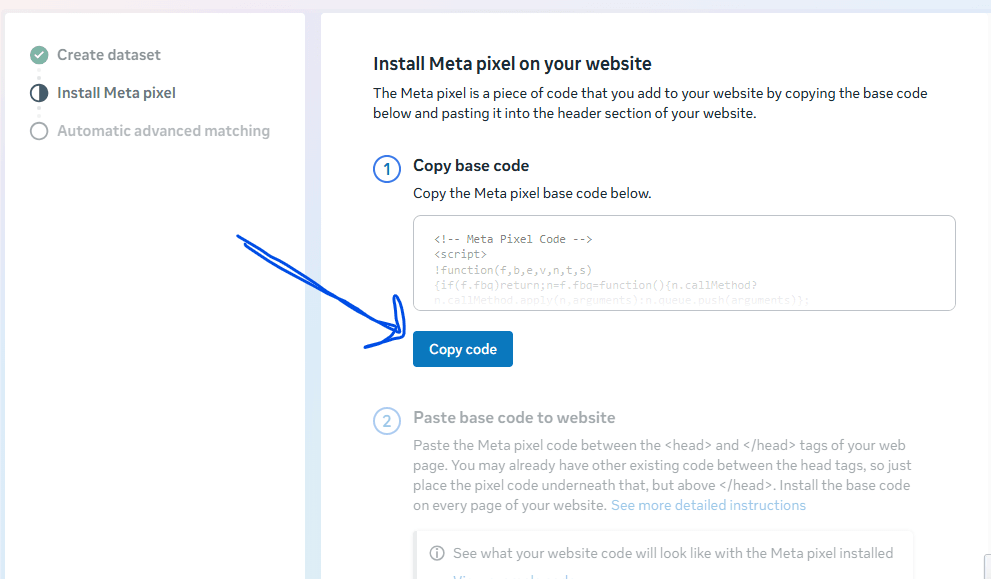
Meta's official guidance is to place the base code on every page where you want to track
activity. Paste it inside the <head> section, replacing
YOUR_PIXEL_ID with your real ID.
<!-- Meta Pixel Code -->
<script>
  !function(f,b,e,v,n,t,s)
  {
    if(f.fbq)return;
    n=f.fbq=function()
    {
      n.callMethod ?
      n.callMethod.apply(n,arguments) :
      n.queue.push(arguments)
    };

    if(!f._fbq)f._fbq=n;
    n.push=n;
    n.loaded=!0;
    n.version='2.0';
    n.queue=[];

    t=b.createElement(e);
    t.async=!0;
    t.src=v;

    s=b.getElementsByTagName(e)[0];
    s.parentNode.insertBefore(t,s)
  }
  (window, document, 'script',
  'https://connect.facebook.net/en_US/fbevents.js');

  fbq('init', 'YOUR_PIXEL_ID');
  fbq('track', 'PageView');
</script>

<noscript>
  <img height="1" width="1" style="display:none"
    src="https://www.facebook.com/tr?id=YOUR_PIXEL_ID&ev=PageView&noscript=1" />
</noscript>
<!-- End Meta Pixel Code -->
In a custom-coded site, that looks like this:
<head>
  <!-- Other website header code -->

  <!-- Meta Pixel Code goes here -->

</head>Swap in your real Pixel ID
There are two placeholders in the snippet. If your Pixel ID were 123456789012345, they'd become:
fbq('init', '123456789012345');src="https://www.facebook.com/tr?id=123456789012345&ev=PageView&noscript=1"Track the actions that matter
The base code only tracks page views. Add standard events for the conversions you care about.
Tracking a lead
Add this after a form has been submitted successfully — for example, on a thank-you page:
<script>
  fbq('track', 'Lead', {
    content_name: 'Property enquiry form'
  });
</script>Don't put the Lead event on the form page itself. If it fires before the visitor submits, Meta will count people as leads even when they never completed the form.
Tracking a purchase
For ecommerce, always include the transaction value and currency:
<script>
  fbq('track', 'Purchase', {
    value: 150000,
    currency: 'NGN'
  });
</script>
Meta's standard event names must be spelled exactly as documented. Common ones:
Install it once — pick one method
Choose a single main installation route. Mixing methods is the most common cause of duplicate events.
Custom-coded website
- Paste the base code directly between the
<head>tags - Add event snippets on the relevant pages
WordPress & site builders
- A Meta Pixel or Facebook plugin
- Google Tag Manager
- A header/footer code plugin
- Your theme's header file
- A builder's custom-code section
Use only one main installation method. Installing the same Pixel through a plugin, your theme code and Google Tag Manager at the same time creates duplicate PageView and conversion events.
Test before you rely on the data
- Fire a test in Meta Events Manager → Test Events
- Check the page with the Meta Pixel Helper browser extension
- Confirm the Pixel is connected to the correct Business Manager and ad account
Using Conversions API too? A Pixel only tracks browser activity. If you also send the same events server-side, use the same event_id for both versions so Meta deduplicates them instead of counting one conversion twice.
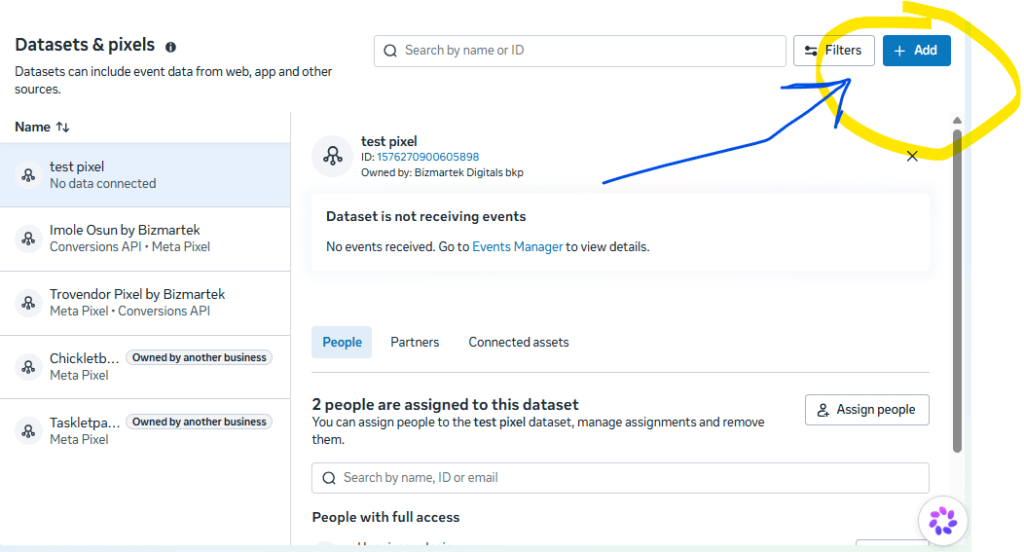
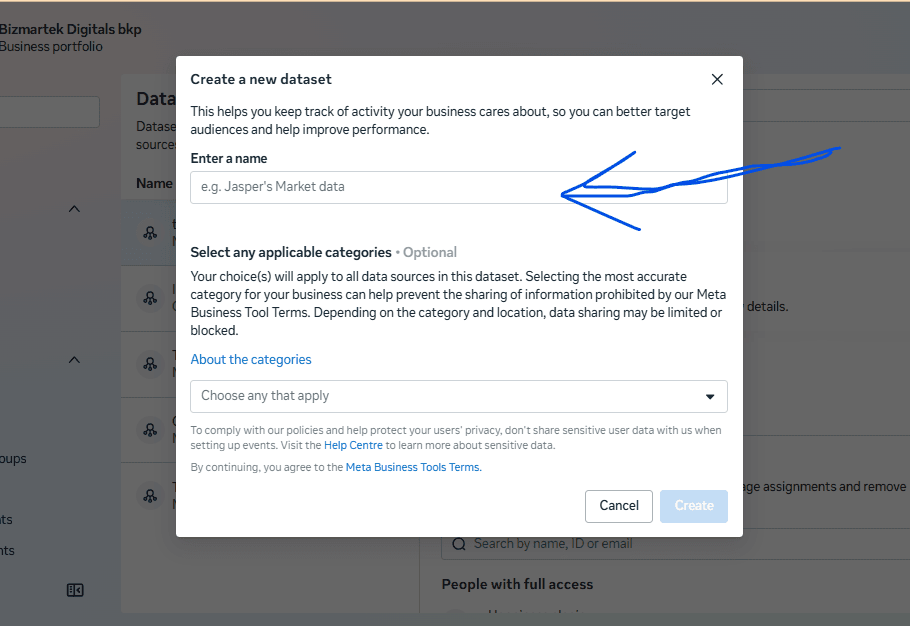
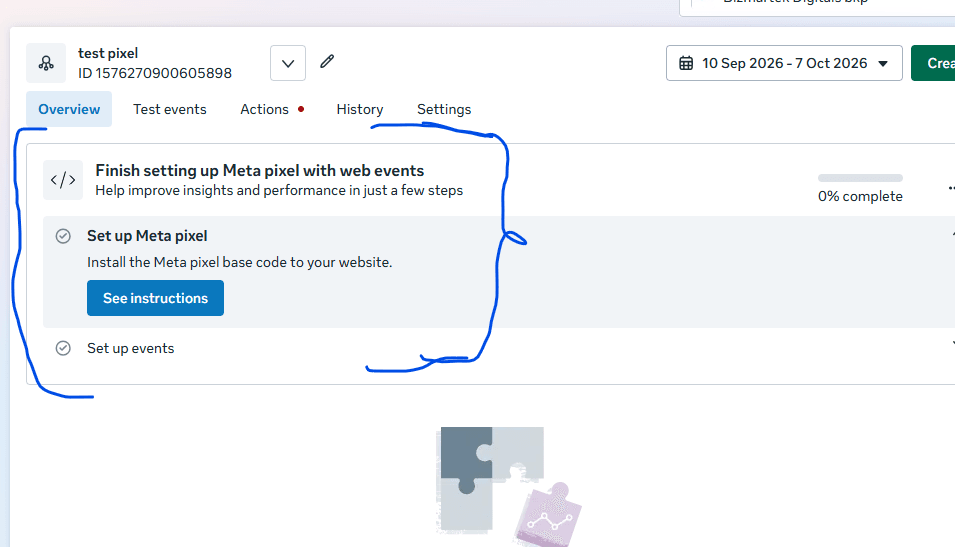
How to create and Install Meta pixel (Step-by-step)
Step 1

Step 2
Step 3
Step 4
Step 5
What is Meta Conversions API and how does it work?
Meta Conversions API sends conversion and customer-event information directly from your server, CRM, website platform, app or other supported business systems to Meta.
Instead of depending entirely on the visitor’s browser, CAPI works more like your company’s back office.
Imagine a customer enters your shop, speaks to a salesperson and later pays at the cashier. Even if the salesperson forgets to write down the purchase, the cashier’s records still show that the transaction happened. Your backend can similarly provide Meta with information about important customer actions.
This makes CAPI particularly useful when the conversion happens after the initial website interaction or when the business already has reliable customer data in a CRM, ecommerce platform, app or other backend system.
Meta says Conversions API can support website, app, offline and messaging events. It can also help advertisers improve measurement, event matching and optimisation.
That does not mean CAPI automatically makes tracking perfect. The data still has to be collected, formatted, matched and sent correctly.
The distinction matters because the two systems see different parts of the customer journey.
The Pixel can observe what happens in the browser. CAPI can receive information from systems that know what happened after the browser interaction.
Meta specifically notes that CAPI website events can be linked to the Pixel and used for similar optimisation and reporting purposes.
Should you use Meta Pixel or Conversions API?
For most businesses, use both rather than treating them as competing tracking options.
Using both gives Meta two routes for receiving conversion signals. The Pixel captures browser-side activity, while CAPI can provide server-side signals that the browser may not successfully transmit.
This is particularly important for businesses where a purchase, lead or other valuable action is recorded by a backend system.
However, installing both does not mean you should simply fire everything twice.
The two systems need to be configured properly so Meta can recognise when a browser event and a server event represent the same customer action. This is where event deduplication becomes important.
Why is event deduplication important when using Pixel and CAPI?
Event deduplication prevents the same conversion from being counted twice when both Pixel and CAPI report it.
For example, suppose a customer buys a ₦100,000 product.
Your Pixel reports:
Purchase — ₦100,000
Your server then sends:
Purchase — ₦100,000
If Meta cannot recognise that both signals refer to the same purchase, your reporting can become distorted.
A shared event ID can be used to identify the same event across browser and server transmissions. The research supplied for this article highlights event ID as a central part of deduplication when Pixel and CAPI are used together.
This is one reason a technically correct CAPI implementation matters more than simply having a CAPI connection switched on.
A poorly configured setup can create duplicate events instead of solving the measurement problem.
Is Meta Conversions API worth it for Nigerian businesses?
Conversions API is most valuable when missing conversion data can affect how you judge or optimise your advertising.
Consider a Nigerian ecommerce business spending heavily on Meta ads. A customer sees an Instagram advert, visits the website, adds an item to cart and eventually completes payment.
If browser-based tracking misses part of that journey, the business may see a mismatch between actual sales and what Meta reports.
CAPI can allow the business to send relevant conversion information from its backend or connected platform to Meta.
The same principle applies to businesses that generate leads rather than immediate online purchases.
For example, a Nigerian real estate company may generate leads through Meta ads, but the meaningful business outcome happens later when a prospect books an inspection or pays a deposit.
A browser Pixel may record the initial website action. A connected CRM can potentially provide Meta with later-stage customer events through Conversions API. Meta describes CAPI as supporting events from CRMs, offline activity and other sources.
That makes CAPI more than a replacement for browser tracking. It can become a bridge between advertising data and the actual sales process.
Can Conversions API track WhatsApp and Instagram conversations?
Conversions API becomes particularly important when the customer journey moves outside a website and into business messaging.
There is no website page inside a normal WhatsApp conversation where your website Pixel can simply run.
If someone clicks an advert, starts a business conversation and later becomes a customer, the final business outcome may exist in your CRM, sales records or messaging workflow rather than on a webpage.
Meta’s documentation states that Conversions API can receive messaging events and help businesses understand actions that happen in business chats on Messenger, Instagram and WhatsApp.
This creates an important distinction for Nigerian businesses that sell through WhatsApp.
A website-heavy ecommerce business may rely heavily on browser and server events.
A WhatsApp-driven business needs to think beyond website tracking because part of its sales funnel happens inside conversations.
How do you create a Meta Pixel?
You create a Meta Pixel through Meta’s Events Manager and then install the resulting tracking code or connect it through a supported integration.
The supplied research describes the basic process as opening Meta Business Manager, going to Events Manager, adding a data source and creating or selecting the Pixel.
The technical implementation depends on the website platform.
A WordPress website, Shopify store and custom-coded website may require different installation methods.
Creating the Pixel is therefore only the first step. You still need to verify that the important events actually fire when customers perform the relevant actions.
How do you set up Meta Conversions API?
CAPI can be implemented through a direct server integration, ecommerce platform, CRM or partner integration, depending on your technical setup.
Meta states that CAPI can be set up in several ways and that some integrations do not require a developer.
A typical implementation involves:
- Identifying the business events worth sending.
- Connecting the relevant website, CRM, ecommerce platform or backend.
- Configuring the Meta credentials and event parameters.
- Sending the events to Meta.
- Connecting browser and server events where both are used.
- Configuring event deduplication.
- Testing the events in Events Manager.
- Monitoring event quality and discrepancies.
The most important point is that CAPI is not valuable merely because it is installed. The quality of the events and customer information being sent determines how useful the resulting data can be.
Is Meta Conversions API free?
The Conversions API itself is a Meta technology for sending event data, but the total cost of implementing it depends on how you connect and maintain it.
A business may have no separate software cost when using an existing platform integration, while another business may need a developer, server-side infrastructure or a third-party integration service.
Therefore, “Is CAPI free?” is less useful than asking:
What will it cost my business to implement and maintain reliable conversion tracking?
For a small business running limited advertising, a simple native integration may be sufficient.
For a business spending substantial amounts on Meta advertising, paying for proper tracking implementation can make more sense because poor measurement can lead to poor advertising decisions.
What are the common Meta Pixel and CAPI mistakes?
The biggest tracking mistake is assuming that installing the tools automatically means your conversion data is accurate.
Common problems include:
- Installing the Pixel but failing to configure important conversion events.
- Sending the same event through Pixel and CAPI without proper deduplication.
- Using incorrect event IDs.
- Tracking low-value events while ignoring the actions that actually generate revenue.
- Failing to test whether events are received correctly.
- Assuming a high or low event-quality score tells the whole story.
- Sending customer data without considering applicable privacy and consent requirements.
- Connecting CAPI without verifying that server events correspond with actual business transactions.
Meta explicitly states that CAPI is not intended to bypass data-sharing policies or privacy requirements.
The objective should therefore be better measurement, not more data at any cost.
Which is better for ecommerce: Meta Pixel or CAPI?
For ecommerce businesses, using both is generally the stronger setup when they can be implemented correctly.
The Pixel provides browser-side signals such as product views and other website interactions.
CAPI can supplement those signals with information from the ecommerce backend, including purchase and other commercially important events.
The supplied research also identifies product views, add-to-cart, purchases, checkout steps and subscription-related events as examples of ecommerce events that can be tracked through CAPI.
The important distinction is not simply “CAPI is better.”
It is that Pixel and CAPI solve different measurement problems.
For a new business testing Meta ads with a simple website, Pixel may be the easiest starting point.
For a business that depends heavily on accurate conversion data, has meaningful transaction volume or sells through multiple customer touchpoints, a properly configured Pixel-plus-CAPI system is more appropriate.
Frequently Asked Questions
What is pixel conversion?
A pixel conversion is a customer action recorded through Meta Pixel and attributed for advertising measurement, such as a purchase, lead or other configured event.
What API does Facebook use for Conversions API?
Meta Conversions API is the server-side mechanism used to send marketing events to Meta’s advertising systems. It can receive events from websites, apps, offline sources and messaging systems.
Can I use Meta Pixel without Conversions API?
Yes. Pixel can operate on its own for browser-based website tracking. However, it remains exposed to browser restrictions and may miss events that a server-side connection could capture.
Can I use Conversions API without Meta Pixel?
Technically, CAPI can send events from server-side systems, but for website advertising, using it alongside the Pixel can provide broader event coverage. Meta recommends considering both for website events.
Does CAPI guarantee 100% accurate tracking?
No. CAPI reduces some browser-related tracking limitations, but inaccurate event configuration, poor data quality, missing parameters, consent restrictions and implementation errors can still produce unreliable data.
Is Meta Pixel still relevant?
Yes. Pixel remains useful for browser-side website events, audience building and measurement. Its limitations are the reason a server-side complement such as CAPI can be valuable.
The practical answer: use the tracking system your sales process actually needs
Meta Pixel and Conversions API are not two versions of the same tool. Pixel observes what happens in the customer’s browser, while CAPI allows your business systems to tell Meta what happened beyond the browser. The strongest setup is therefore not about choosing the “better” technology; it is about connecting the advertising platform to the parts of your customer journey that matter financially.
For Nigerian businesses, this distinction is particularly relevant when sales happen across websites, ecommerce stores, WhatsApp conversations, phone calls, CRMs and physical transactions. Properly implemented Pixel and CAPI tracking can give Meta better signals to work with and give the business a more credible picture of what its advertising is actually producing. Meta also states that CAPI can help improve connectivity, measurement, event matching and optimisation.
If your Meta advertising is generating traffic but your reported conversions do not match your actual leads or sales, the next step is not automatically to increase the ad budget. Audit the tracking first: identify the revenue-producing events, verify Pixel firing, configure CAPI where appropriate, implement deduplication, test the events and compare Meta’s reporting against your actual business records.
For businesses that need professional implementation or ongoing Meta advertising support, Bizmartek’s Facebook and Instagram advertising service can provide the broader campaign infrastructure around these tracking requirements.
Ready to Grow Your Sales Online?
Stop guessing. Get proven digital marketing strategies that bring in real customers.
Get Started With Us ↗Free to start • No credit card required
Explore SOCIAL MEDIA MARKETING Mastery

Set Up Social Media Ads Like a Pro: Step-by-Step Guide for Small Businesses
How Social Media Ads Work: A-Z Guide for Nigerians
How to Spot the Right Social Media Ad Agency: A Practical Checklist for Nigerian Businesses
Dopamine Algorithm Health Effects: Pros, Cons & Lifestyle Impact
View More SOCIAL MEDIA MARKETING Articles (17 more)
Dopamine Algorithm: How Social Media Hooks Your Brain

Meta Lawsuit Settlement: What It Means for Instagram Users
3 Types of Ads Every Small Business Owner in Nigeria Should Be Running
TikTok’s Goal-Based Budget Increase Tool: An Honest Review & Warning for Advertisers

How to Run TikTok Ads in Nigeria 2026

Does Instagram Pay Creators in Nigeria? (The Truth)
Social Media Platforms That Pay Users Nigeria 2026: The Complete Creator Ad Revenue Guide
When is the Best Time to Post on TikTok and Instagram in Nigeria? (2026 Update)
The Ultimate No-Dollar-Card Fix for Nigerian Businesses

Social Media Marketing for Real Estate in Abuja

Why Your Ad Isn’t Converting (And How To Fix It Fast)

Social Media Demographics 2026 (know your customers)

Social media campaign objectives

Social media lead generation in 2025

social media marketing meaning

Top New Social Media Marketing Strategies